Sunday, August 9, 2015

Windows 10 Review: Finally a Worthy Upgrade from Microsoft

4 years ago, Microsoft released first developer preview of Windows 8. They took the risk and migrated their design philosophy from traditional keyboard-mouse friendly desktop applications to full-screen touch-friendly Metro apps. This was the major transformation in their beloved Windows 7. The complete desktop environment and its features were treated as a separate app in Windows 8 (the same way MS-DOS was a bit important part of Windows 95). People loved (and still love) the Windows 7 the way it was. 'Start menu', which was the heart of Windows was replaced with a Start screen full of large square boxes. All the crucial system functions were moved to so-called 'Charms bar' in right side of screen. With this major step, Microsoft basically intended to move users from 'traditional' desktop environment to 'modern' touch-based tablet environment. It was also a part of Microsoft's plan to make users familiar with their metro apps (or modern apps, or store apps, whatever you call it!) to gain share in mobile market with Windows 8's mobile variant, Windows Phone 8. Windows RT was yet another variant of Windows 8 specially for ARM-based tablets.
Well, a device with Windows RT created an ok tablet. Microsoft released Surface, Surface 2 and Surface 3. But it was in direct competition with Apple's giant, iPad along with many cheaper Android tablets and hence failed to gain popularity. Nokia Lumia devices with Windows Phone 8 gained a bit of popularity and their market share increased by 0.8-1% (Still a huge move in mobile market for Microsoft!) which was decreased by 0.5% in 2015 Q1. Coming to desktops, Microsoft forced users to buy Windows 8 which came along with newly purchased notebooks. Only 15-20% of industry users were actually migrated to Windows 8.


Windows 8 basically confused users to choose between modern interface and desktop interface. All the core functionalities of OS were moved to full-screen Metro based settings instead of friendly Control Panel. Microsoft later came up with a minor update, Windows 8.1 which basically tried to fix the situation with Start button on taskbar, close and minimize buttons on title bar of modern apps etc. But nothing worked. An attempt of Microsoft to bring uniformity in mobile, desktop and tablet environments failed miserably. With this whole mess that Microsoft created with Windows 8, there was a need to go back to basics, making Windows the way users loved it. And this was the foundation stone of Windows 10! This is the last time we are seeing any major Windows release. Microsoft basically wants to stop hurdle of getting users to its latest platform by 'Windows as a service' strategy, just like Apple's Mac OS X. Apple has been providing users free yearly upgrades for OS X since 10 years. This is the first time in history Microsoft is adopting this strategy for its products and it's really a good change. With Insider program, Microsoft listened to feedback from millions of Windows fans and added new features accordingly in preview builds.
29th July 2015, was a big day for Microsoft. Windows 10 was released as a free upgrade to all genuine users of Windows 7 and Windows 8/8.1. Just like Windows 7 cleaned up mess created by Vista, Windows 10 is here to clean up mess created by Windows 8. Windows 10 is basically amalgamation of all good features of Windows 7 and 8. Microsoft basically added many new features to the OS keeping all the beloved features intact and removed all annoying touch specific features like charms bar.
After boot, you are taken to friendly desktop instead of full-screen start screen.


Taskbar looks much improved with some extra useful toolbars. After clicking on start button, you can notice the return of 2-column Start menu with newer look and feel. But I personally still find Windows 7's start menu much friendlier. All the 'live' tiles inherited from Windows 8 are still on the right side. Love them or hate them, they are there and the only way users have is to adopt this change.


"All Apps" takes you to the list of all applications containing apps from Windows Store as well as "traditional" desktop apps.


Looks good! If you have used Windows 8 for long time, it's like meeting your lost older friend again!
All the apps from Windows Store now have a new home. These apps now launch in their individual windows instead of alien full-screen.


This is a welcome change. You can now resize, minimize, maximize or close these windows. Metro UI is now significantly improved with much better design and new controls friendly for keyboard-mouse and touch as well.
Windows 10 now comes with Microsoft's answer to voice assistant, the Cortana, a rival for Google Now and Apple's Siri.


With "Ask me anything" toolbar of Cortana, you can search apps, settings, web, files and a lot more.
"Multiple Desktops" is yet another good feature of Windows 10. It is same as Ubuntu workspaces. 


You can quickly create a new instance of clean desktop, in case it is crowded with opened apps. Few issues are still there in this feature. But they will be fixed in new updates.
With all the funny internet trolls and bad reviews, Microsoft has finally decided to kill its highly criticized web browser "Internet Explorer" from Windows 10. Windows now comes with fresh new "Edge".


Unlike Internet Explorer, Edge is a WebKit based browser and serves as a good alternative to Chrome and Firefox, especially for those who avoid these opensource browsers for security issues. Edge performs a way better and faster than IE.

Windows 10 comes with a dedicated "Action Center" on right side which contains all important system notifications and Quick toggle actions like Wi-Fi, Bluetooth, Airplane mode etc.


All the important system settings in Windows 10 are now moved to modern "Settings" app. While Control Panel is still available for advanced configuration settings, Settings app is designed for quick settings like System, Devices, Network, Accounts, Updates etc.


 I still find Control Panel sophisticated and friendlier than Settings app. Some advanced settings are available in both Settings and Control Panel.


People which are "used to" with Windows 7 are going to find Settings app as totally alien interface. I expect improvements in Settings app in coming updates.

There is a special feature in Windows 10, called as "tablet mode" designed specially for touch-based devices and acts as updated tablet version of Windows 8.


This was the most demanded feature by Windows fans. It shows a touch-friendly interface specifically designed for tablets. But obviously, no one is going to use it on desktops and laptops.

Unlike previous versions of Windows where you can disable Auto-Updates, in Windows 10 you can't simply disable Auto-Updates. You have no idea when your computer downloads and installs updates. But this is the major step of Microsoft to kill piracy by forcefully providing all users the latest updates. After finishing installing updates, Windows requires a restart which a user can schedule on his demand. Instead of providing updates for complete OS after few years, new update program of Windows will now provide updates for individual apps and components like start menu, taskbar etc.

Windows NT kernel, which is the heart of Windows, now has version number NT 10.0, directly jumping from NT 6.3 in Windows 8.1.

NT 4.0
NT 5.0: Windows 2000
NT 5.1: Windows XP
NT 5.2: Windows XP 64-bit Edition
NT 6.0: Windows Vista
NT 6.1: Windows 7
NT 6.2: Windows 8
NT 6.3: Windows 8.1
NT 10.0: Windows 10

Finally, a good step by Microsoft to make sense in OS version number by matching it with NT kernel version number.


Thus, with so many welcomed good features and few shortcomings (that we hope to be fixed with updates), Windows 10 acts as a worthy upgrade from Microsoft after Windows 7. Microsoft has finally understood its dominance on desktops and solved most of the mistakes made with Windows 8. Our beloved desktop OS is now much powerful, faster and better to use. If you are a Windows 7 user who hesitated to use Windows 8, this is the time for you to upgrade. You will get most of your PC with Windows 10.

Microsoft now comes with "One Product Family, One Platform, One Store" strategy and we have high expectations on Windows 10 to fulfill it. Mobile variant of Windows 10 which is "Windows 10 Mobile" is expected to launch in September and has already captured attention of mobile users with its preview. But everything related to it in my next post. If you still have questions in mind regarding Windows 10, you can post them in comments. Thanks!

Saturday, July 4, 2015

Airtel 4G Network Review in Pune

I was always curious about 4G LTE technology. Airtel has launched TDD-LTE in India on 2300 MHz band 3 years ago. But expansion of this 4G network was steady because of lack of 4G device ecosystem. Very few among all 4G devices support 2300 MHz band. FDD-LTE on 1800 MHz band is more common in the world. But now situation is different. Many mobile manufacturers are supporting TDD-LTE before launching their product in India. 4G mobiles are now available in India for price as low as Rs 5000.
Recently, I bought Nokia Lumia 638 which is currently the cheapest 4G mobile in India for Rs 5400. The phone has moderate configuration with Quad-core Snapdragon 400 processor, 1 GB RAM, 8 GB internal memory, 5MP camera and most important 4G TDD-LTE support.
Firstly, I inserted my Airtel SIM card in the phone but it was showing no 4G network option in network mode. Later, I realised that 4G network needs a brand new 128k SIM which is different from normal 64k SIM which is used for 3G/2G.
I contacted local Airtel outlet and exchanged my existing SIM with 128k 4G ready SIM. Now I got 4G option that I was expecting.


As Airtel 4G coverage is currently very weak in Pune, I had to go outside to hunt for 4G network. On highway, there was a good 4G coverage. I saw 4G symbol for the first time on my device. That was really a moment full of happiness :D


I performed a network search on the same place and I was getting Reliance Jio's 4G network also. But I couldn't figure out whether it was FDD-LTE or TDD-LTE.


In recent spectrum auction of 2015, major telecom players in India like Idea, Airtel, Vodafone and Jio have purchased 1800 MHz spectrum from Government for FDD-LTE which is more common worldwide. So we can expect FDD-LTE launch in coming months.

Further I performed many network speed tests at various locations in Pune and I was getting 20 Mbps speed on an average.


4G network doesn't support traditional services like voice calls, USSD and SMS. The network automatically switches to 2G or 3G when any incoming/outgoing call or SMS is there. This switching is seamless and very fast. Battery consumption on 4G is still moderate and depends on how much data you download on phone with 4G network.
Currently, Airtel 4G plans are same as 3G. As you recharge with any 3G plan, you get 4G speeds whenever the network is available.
Well, Airtel 4G network in India is currently ok ok. It just provides higher speeds than 3G and has lower latency. With Cat. 4 LTE that my Lumia 638 supports, theoretical peak speed of 4G network is 150 Mbps. So, 4G in India is still is in infant stage with lower coverage and average performance.
My hopes are on the next big thing Reliance Jio (RJIL). Expected launch of Reliance Jio's 4G is in December 2015. Still a few months away!
I will share with you as soon as I get any update about that. Till then, stay tuned!

Friday, December 12, 2014

LTE User Equipment (UE) Categories: Which one is meant for you?

Many companies are launching their 4G-enabled phones from this year. Recently launched Xiaomi's MI Note 4G is available in India for Rs 8999.
Different 4G phones come with different speeds. LTE UE category of the device decides max downlink/uplink speed that it supports.
In this post, I am going to summarise various LTE UE categories from 3GPP and devices which support particular category.

CategoryMax Downlink Speed (Mbps)Max Uplink Speed (Mbps)3GPP ReleaseNo. of Supported MIMOSupported Devices
Cat 1105Rel. 8 (LTE)1N/A
Cat 25025Rel. 8 (LTE)2N/A
Cat 310050Rel. 8 (LTE)2Original Moto X, iPhone 5
Cat 415050Rel. 8 (LTE)2Nexus 5, Moto G 4G, Moto X (2nd Generation), iPhone 6, MI Note 4G, Samsung Galaxy S5, LG G3
Cat 530075Rel. 8 (LTE)2N/A
Cat 630050Rel. 10 (LTE-Advanced)2 or 4Huawei Honor 6, Samsung Galaxy S6 LTE-A, LG G3 LTE-A, Nexus 6
Cat 7300150Rel. 10 (LTE-Advanced)2 or 4N/A
Cat 81200600Rel. 10 (LTE-Advanced)8N/A
Cat 945050Rel. 11 (LTE-Advanced)2 or 4N/A
Cat 10450100Rel. 11 (LTE-Advanced)2 or 4N/A

Among these, Cat 3, Cat 4 and Cat 6 devices are more common. Cat 9 devices will arrive in 2016.
Cat 3 devices are slowly becoming outdated and most of the phones coming next year will support Cat 4 LTE. Cat 6 and above UE categories are also mentioned as LTE-Advanced. Carrier aggregation is the special characteristic of LTE-Advanced. It allows to aggregate two distinct parts spectrum for better network throughput and hence higher speeds.
Cat 4 LTE will be in many budget 4G phones coming next year. Many cheaper Snapdragon SOCs including 210, 400, 410, 610, 615 and 800 support Cat 4 LTE. Cat 6 LTE is supported by high-end Snapdragon SOCs like 805 and 808. It is mostly meant for high end flagship phones. Snapdragon 810 SOC includes support for Cat 9 LTE. But no device currently supports it. Alright, that's enough information to check how much LTE potential your device has.

Tuesday, June 11, 2013

Software Coder and a Driver: LOL!

Welcome back after a long break! After publishing my own articles on various technological innovations, I'm publishing a fact based on the present condition of Indian IT and software industry. It proves that coding or programming is such a skill just like cricket or driving. But, the Science background is mandated behind this skill by our educational system. You will also believe this as you go through it!
The content has been taken from another blog named
interim thoughts. Special thanks to the unknown publisher of this article.
-Nitish

Of geeks and coders
Tuesday, October 03, 2006

Recently, I had this discussion around the issue of qualification for a software developer. Indian IT services companies often issue recruitment ads asking for first class engineers from the best colleges in India. Notably the IITs. That was how some of the companies started. Then they climbed down, going to the best non IIT colleges. Then they climbed down and now almost any engineer with a first class can make it through to most companies.
There are many other companies who ask for best in class graduates. Some companies prefer NIIT graduates - who are not engineers, though many of them are engineers too.

Really, what is the level of qualification required to be a software developer? This is a funny question if you ask me, since it is like asking what qualification do you require to be a driver. To be a driver, you need no qualification. If you are an MA or a M Ed, well, good luck to you but that has no bearing on whether you get a driving licence or not. As long you can drive a vehicle well and convince the RTO inspector that you can, you get a licence and you can drive.

To be a coder, is exactly like that. In India many people (and companies) make us believe that you need a science background to learn coding. It is like asking for mechanical engineers when what you really want are drivers.

I have some of my friends as young as 8th standard who have waded knee deep into coding. I know of some who have created small tools and other patches even before they cleared their class Xth exams. I know of accountancy grads who are experts in coding/hacking. One of the guys who studied with me had created his own game - and he was not even a graduate - his dad has passed him a defunct PC which he had made good use of. Qualification - well nothing. Except that they loved doing what they did.

Google Jam is a step in the right direction. I wish service companies in India too tried and picked up geeks this way rather than a traditional formal-tie interview process. These are the geeks who will create more code juice and innovate - they may not follow coding standards though and geeks oten come with their own idiosyncracies - which service industries hate. But Google and Microsoft? They love 'em.

The highly qualified educated coder who gets into the IT service industry today wants to "get out of coding" even as he sets foot in the industry - with the result that the industry is filled with (generally) low technical skills. The industry also "rewards" good coders with management positions with the result that they lose their technical skills and that is often seen as the only way to grow in the firm. (That last part is changing though the hiring is still done the old way.)

One point here is that good educational qualifications (ranging from any graduation to post graduation or an MBA) help in assessing whether a potential employee can create documentation, processes - but thats not the same as coding. What IT service companies do need is a mixture of low to medium end coding skills at the entry level followed by good communication, presentation and documentation skills at the next levels. Honestly, you need neither first class engineers nor first class graduates at the entry level in an IT service company. You do need a high level of presentation skills, negotiation skills, strategic thinking at a managerial level and beyond.

Coming back, coding is a fair bit about self interest, which is about the geek - someone who lives, talks and breathes code - and nobody can teach you to do that (not for code, not for music, not for blogging). This is for those whom computers (or central excise or dance) is a passion.

The other part is around technical training, which is for the NIITs and their ilk to milk. The engineering colleges should really get out of creating newer engineering streams for Information Technology (IT - this thing sells like crazy) and focus on creating engineers not coders.

Make no mistake, the uber technical chaps are highly regarded, paid as much as (if not far better -look at any core tech companies payscales) than uber domain guys and there will always be a continuous demand for technology professionals at all levels. And, once again, it does not matter what qualification you have as long as you have a licence to drive (or code).

Sunday, March 10, 2013

Blu-ray: The King of Optical Storage Technology

Let's turn towards the era of multimedia. IT has played a very leading role in digital multimedia, movies, music etc. The chief requirement in this field is 'storage'. This storage must be rich, reliable, secure, easily available and easy to handle. The first handy storage for computers was 'floppy disc' invented by IBM in 1971. The floppy had a little data storage capacity of 1.44 MB which was not fit to store multimedia files.
Later in 1982, Sony Inc. of Japan invented a new medium to store a huge information. This was 'Compact Disc' simply called as CD. CD was originally invented for storage and playback of digitally recorded sound. CD was later allowed to store other digital files. CD is still used as standard physical medium for storage of digital sound. The capacity of CD is 700 MB. It can store 80 minutes of uncompressed digital audio with high bitrate of 1441 kbps. CD is still very popular and widely used medium for data. Sony also developed a special format of CD to store video also. This format was VCD (Video Compact Disc) which is still used. VCDs contain 80 minutes of moderate-quality video with CIF resolution and MPEG-1 as video codec. VCDs also got popular all over the world.

In the same time, the capacity of computers was highly increasing and it was found that CD cannot store this much data. Also, it was not possible to watch full-length high-quality movies on CD due to its insufficient capacity. So, there was a need of new invention. So, technicians developed a new media similar to CD in dimensions but 7 times high storage capacity. This media was DVD (Digital Video/Versatile Disc). DVD was primarily developed for storing high-quality full-length movies or videos with 4CIF resolution and MPEG-2 as video codec. DVD is now used for delivering high-quality movies. DVD has a capacity of 4.7 GB with a single layer and it almost completely fulfills all the technical requirements.

Let's turn towards our main subject. Why there was the need of new invention though DVD fulfills all requirements sufficiently? This is because of the invention of HDTV (High Definition Television) sets. These HDTV sets began to appear in 1999. HDTVs are the television sets that can support video signal of very highest resolution with improved picture, sound clearity and frame-rate. HD video files require very high memory space for storage and playback. Even though this much resolution is not available on some screens, this resolution is included as a part of signal. So, it was found that DVDs are really unable to store this HD video which requires a much more as compared to space on DVDs.

This new invention was done in 2004 by Toshiba. They invented a new media similar to CD and DVD. This invention was HD DVD. It had a capacity of 15 GB per layer. So, it could store HD movies. But at the same time, the similar invention was being done by Blu-ray disc association. This association developed a similar optical disc to CD and DVD having a rich data storage capacity of 25 GB per layer which is also much higher than HD DVD. This was 'Blu-ray Disc' officially called as BD.
So, the battle between HD DVD and Blu-ray Disc began to get permanently located in market. This battle is called as 'Optical Disc Format War' which got ended in 2008. So, BD was the winner of this war. The commercial Blu-ray Disc Player was released in 2010.


Let,s discuss about specifications of Blu-ray Disc. We will simply call it as BD throughout the rest of this article. As discussed earlier, BD can store 25 GB of data per layer. It can store this much data because it uses a laser of very shorter wavelength or color as compared to CD or DVD. In CD/DVD, the red laser of wavelength 650 nanometer is used to read/write. On the other hand, BD uses a laser of 405 nanometer. Though the name suggests 'Blue' color, the actual color of laser comes in 'Violet' region of spectrum. Due to this mechanism, BD stores 5 times more data than that allowed by DVD.


The writing speed of BD varies from 1x (4.5 MB/s) upto 12x (54 MB/s). It has the same dimensions as that of CD/DVD. BD has been released in two formats namely, recordable and rewritable. Recordable or blank BDs are called as BD-RE's. Rewritable BD's are especially developed for HD camcorders.
BDs are primarily developed to store High Definition full-length movies. They can store 1080p HD video with new and efficient codec MPEG-4 AVC or H.264. This is very popular and commonly used video codec now a days. It is also used on streaming videos of YouTube. Its official media container is .MP4.
All the Hollywood movies are nowadays delivered in both DVDs and BDs and many PC or notebook vendors are including Blu-ray Disc Drive in-built in their products.

Right now, the only drawback of BDs is that they are very costly and not affordable to common man. I think their market prices will get down very shortly. But, still we have to wait for its arrival and let's enjoy with our traditional DVDs!

Thanks and regards,
Nitish R. Muley

Monday, January 21, 2013

A conversation between a Soldier and Software Engineer in Shatabdhi Train

Hi! This post is the very much interesting to you even if you're not from IT field. Must read!
The content has been taken from Notes of a Facebook page Service Selection Board of Indian Military.


Vivek Pradhan was not a happy man. Even the plush comfort of the air-conditioned compartment of the Shatabdhi express could not cool his frayed nerves. He was the Project Manager and still not entitled to air travel. It was not the prestige he sought; he had tried to reason with the admin person, it was the savings in time. As PM, he had so many things to do!!
He opened his case and took out the laptop, determined to put the time to some good use.
"Are you from the software industry sir," the man beside him was staring appreciatively at the laptop. Vivek glanced briefly and mumbled in affirmation, handling the laptop now with exaggerated care and importance as if it were an expensive car.
"You people have brought so much advancement to the country, Sir. Today everything is getting computerized. "
"Thanks," smiled Vivek, turning around to give the man a look. He always found it difficult to resist appreciation. The man was young and stockily built like a sportsman. He looked simple and strangely out of place in that little lap of luxury like a small town boy in a prep school. He probably was a railway sportsman making the most of his free traveling pass.
"You people always amaze me," the man continued, "You sit in an office and write something on a computer and it does so many big things outside."
Vivek smiled deprecatingly. Naive ness demanded reasoning not anger. "It is not as simple as that my friend. It is not just a question of writing a few lines. There is a lot of process that goes behind it."
For a moment, he was tempted to explain the entire Software Development Lifecycle but restrained himself to a single statement. "It is complex, very complex."
"It has to be. No wonder you people are so highly paid," came the reply.
This was not turning out as Vivek had thought. A hint of belligerence crept into his so far affable, persuasive tone. "
Everyone just sees the money. No one sees the amount of hard work we have to put in. Indians have such a narrow concept of hard work. Just because we sit in an air-conditioned office, does not mean our brows do not sweat. You exercise the muscle; we exercise the mind and believe me that is no less taxing."
He could see, he had the man where he wanted, and it was time to drive home the point.
"Let me give you an example. Take this train. The entire railway reservation system is computerized. You can book a train ticket between any two stations from any of the hundreds of computerized booking centers across the country.
Thousands of transactions accessing a single database, at a time concurrently; data integrity, locking, data security. Do you understand the complexity in designing and coding such a system?"
The man was awestruck; quite like a child at a planetarium. This was something big and beyond his imagination.
"You design and code such things."
"I used to," Vivek paused for effect, "but now I am the Project Manager."
"Oh!" sighed the man, as if the storm had passed over,
"So your life is easy now."
This was like the last straw for Vivek. He retorted, "Oh come on, does life ever get easy as you go up the ladder. Responsibility only brings more work.
Design and coding! That is the easier part. Now I do not do it, but I am responsible for it and believe me, that is far more stressful. My job is to get the work done in time and with the highest quality.
To tell you about the pressures, there is the customer at one end, always changing his requirements, the user at the other, wanting something else, and your boss, always expecting you to have finished it yesterday."
Vivek paused in his diatribe, his belligerence fading with self-realization. What he had said, was not merely the outburst of a wronged man, it was the truth. And one need not get angry while defending the truth.
"My friend," he concluded triumphantly, "you don't know what it is to be in the Line of Fire".
The man sat back in his chair, his eyes closed as if in realization. When he spoke after sometime, it was with a calm certainty that surprised Vivek.
"I know sir.... I know what it is to be in the Line of Fire......."
He was staring blankly, as if no passenger, no train existed, just a vast expanse of time.
"There were 30 of us when we were ordered to capture Point 4875 in the cover of the night.
The enemy was firing from the top.
There was no knowing where the next bullet was going to come from and for whom.
In the morning when we finally hoisted the tricolour at the top only 4 of us were alive."
"You are a...?"
"I am Subedar Sushant from the 13 J&K Rifles on duty at Peak 4875 in Kargil. They tell me I have completed my term and can opt for a soft assignment.
But, tell me sir, can one give up duty just because it makes life easier.
On the dawn of that capture, one of my colleagues lay injured in the snow, open to enemy fire while we were hiding behind a bunker.
It was my job to go and fetch that soldier to safety. But my captain sahib refused me permission and went ahead himself.
He said that the first pledge he had taken as a Gentleman Cadet was to put the safety and welfare of the nation foremost followed by the safety and welfare of the men he commanded... ....his own personal safety came last, always and every time."
"He was killed as he shielded and brought that injured soldier into the bunker. Every morning thereafter, as we stood guard, I could see him taking all those bullets, which were actually meant for me. I know sir....I know, what it is to be in the Line of Fire."
Vivek looked at him in disbelief not sure of how to respond. Abruptly, he switched off the laptop.
It seemed trivial, even insulting to edit a Word document in the presence of a man for whom valor and duty was a daily part of life; valour and sense of duty which he had so far attributed only to epical heroes.
The train slowed down as it pulled into the station, and Subedar Sushant picked up his bags to alight.
"It was nice meeting you sir."
Vivek fumbled with the handshake.
This hand... had climbed mountains, pressed the trigger, and hoisted the tricolour. Suddenly, as if by impulse, he stood up at attention and his right hand went up in an impromptu salute.
It was the least he felt he could do for the country.
PS:- The incident he narrated during the capture of Peak 4875 is a true-life incident during the Kargil war. Capt. Batra sacrificed his life while trying to save one of the men he commanded, as victory was within sight. For this and various other acts of bravery, he was awarded the Param Vir Chakra, the nation's highest military award.

Sunday, July 1, 2012

A Small Attempt to Make You Look Into the Future: 4G

The vision of mankind is always beyond the future. The communication technology has developed very rapidly since last few decades. The mobile phone has became the window to the world of information. While 3G is revolutionary thing that man has achieved. The attempts are being made to develop 4G that is the fourth generation communication technology. Very soon within a year the 4G will be ready for deployment. I explained you briefly about 1G, 2G & 3G. This post is targeted towards all the technical predications about 4G.

Although 3G was revolution and just like extension to existing 2G services, 4G is a evolution. 4G is entirely new thing distinct from 2G and 3G telephony. 4G is chiefly aimed to enable users to have uninturruptible and and amazingly high-speed internet access which is give rise to several new features, for example real-time HD video conferencing, streaming, live TV, online gaming, telepresence etc. The whole mobile network architecture is redesigned to achieve high-speed connectivity.

The air interface used in 4G, as explained before is LTE (Long Term Evolution). Just like 2G uses TDMA, 3G uses WCDMA, 4G uses a new technology known as OFDMA (Orthogonal Frequency Division Multiple Access). The core network of 3G is WCDMA. Similarly the core network in 4G is referred as SAE (System Architectural Evolution). This core network is flat all IP network. The major advantage of SAE is that it is designed in such a way to accommodate all networks such as GSM, CDMA, Wi-fi (IEEE 802.11) , Wimax (IEEE 802.16) . That is the device supported with Wi-fi, Wimax etc. can be also supported by SAE. 4G uses MIMO (multiple-input and multiple-output) technique to achieve this much data rate. MIMO is the use of multiple antennas at both transmitter and receiver to improve communication performance and efficiency.

The 4G is totally devoted to data communication and there is no support for traditional voice calls. You cannot dial a phone number directly. Thus, all voice calls are VoIP calls. Your voice after dialing any number gets routed towards the IP network and not PSTN network. By the way, there is also support for IP video calls with much higher quality and less image and voice distortion as compared to 3G video call.

Considering speeds, there is peak download speed upto 1 Gbps and upload speed upto 0.5 Gbps in 4G SAE if the operator has reserved spectrum of 20 MHz.

That's all! Verizon in USA and Vodafone in Germany have successfully launched 4G services. Probably in India the, 4G will arrive after 2015 considering the interest of operators and people. I think my small attempt to make you look into the future will be indeedly successful!

Thanks and regards,
Nitish R. Muley

Wednesday, March 7, 2012

Media Codecs, Containers and Formats: A Ready Reference

Digital Media is a revolutionary thing all over the world and is the cheapest source of entertainment as well as infotainment for a common person. In the last decade, the availability and emulation of digital media is so much increased. We can't stay away from our MP3 players, iPods and cellphones. MP3 music is the greatest invention for music industry and is very much easily available anywhere. The popularity of MP3 is mainly due to its flexibility, platform independence and its fine compression which can produce better quality audio at lower bitrates (usually 128 kbps is preferred). But still, there is somewhat confusion among people about the media formats, codecs and containers. Today, I am going to tell you everything about these things. Usually, the common audio formats that we use are .wav, .mp3, .aac, .amr, .wma, .m4a etc. On the other hand, the video formats are .mpg, .avi, .mp4, .3gp, .mkv, .wmv etc. Every format is developed for a particular purpose and is emulated on particular platform.
In the sense, digital media (audio or video) is compressed into relatively small files by a software known as ‘coder’ and is again reproduced into original media by the software called as ‘decoder’. The word ‘codec’ refers to the amalgamation of coder (co) and decoder (dec). We have to install a particular codec on our system to emulate or play particular format of media. Three type of codecs are 1. Image codecs, 2. Audio codes and 3. Video codecs.
MPEG (Moving Pictures Experts Group) is the standardization group of experts of ISO which develops and sets standards for video and audio compression and transmission. Another group of this standardization is VCEG (Video Coding Experts Group) which is formed by ITU (International Telecommunication Union).

Audio Codecs:
The consumer audio comes from music industry originally in ‘compact discs’ (CDs). This audio is in uncompressed format which provides very much good and surround quality of sound. A CD contains 80 minutes of this uncompressed audio. It doesn’t require any codec software for playback or emulation. This uncompressed audio requires a lot of space on disc. This space is not available on many systems. So, this uncompressed audio is ‘ripped’ on hard disc and compressed into small files by the ‘codec’ that we manually choose. These codecs compress the audio into very small-sized files (of few MBs) which are easier and better for playback. Let me summarize some of the main audio codecs:

1. PCM (Pulse Code Modulation): This is very basic method to represent analog voice signals digitally. It was invented in 1937. But, it is still the standard form of digital audio in computers, telephones and other systems. This is the lossless codec implies audio is not compressed in this format. Its filename extension is .wav.
2. MP3 (MPEG-1 Audio Layer-3): This codec was designed by MPEG and is patented by USA in 1993. It is the lossy method of audio compression implies during compression there is some loss. It reduces the amount of data required to represent an audio signal. Thus, gives the same quality of sound as that of CD. The MP3 file created is about 11 times smaller than original CD at bitrates of 128 kbps. Thus it is very efficient codec. Its filename extension is .mp3.
3. AMR (Adaptive Multi-rate Audio): This is audio compression codec designed especially for human speech recording. This is adapted by GSM and UMTS as their standard audio codec. Usually, digitally recorded audio is compressed using AMR which vomits the streams other than human speech resulting many hours of recorded speech compressed into few MBs. This was invented in 1999. Two forms of AMR are NB (Narrowband) WB (Wideband). This is used in real-time audio streaming on web due to its small size. Its filename extension is .amr.
4. MIDI (Musical Instruments Digital Interface): This is actually not a codec but is the method optimized for storing and reproducing instrumental music streams. This stream doesn’t contain actual audio signal but contains codes of particular instrument at a particular frequency. So, the whole music stream is stored in few KBs saving disc space. Its filename extension is .mid.
5. MP2 (MPEG-1 Audio Layer-2): This was developed by MPEG is now replaced by MP3 but remains dominant for audio broadcasting and is used on Video CDs. Its filename extension is .mp2.
6. AAC (Advanced Audio Coding): This format is successor to MP3. This is the lossy compression codec for storing digital audio and is now standardized by ISO. It achieves better audio quality than that of MP3 at similar bitrates. It is the default audio codec for Apple Inc. products. Apple Lossless format is the implementation of AAC. It is also adopted as the audio part of MPEG-4. Its filename extension is .aac or .m4a. .m4a refers to MPEG-4 audio stream.
7. WMA (Window Media ™ Audio): This was created by Microsoft Corporation and is the default audio codec for Microsoft Windows and their products.


Video Codecs:
The playback of digital video on computer system is not very simple because if video is uncompressed, it consumes a lot of GBs of hard disc and also volatile memory. So, video often comes in compressed form. Following are the most common video codecs:
1. Motion JPEG: This is the most basic video codec where each video frame is compressed as a stream of JPEG images. It is the lossy video codec. It is common in video-cameras.
2. MPEG-1: It is the lossy codec for video compression developed by MPEG. It is now a widely compatible video codec. This codec is used in Video CDs, digital cable/satellite broadcasting.
3. MPEG-2: This codec is successor to MPEG-1. It was primarily developed for ‘Digital Television Broadcasting’, cable and satellite TV. The first version of technology for DTH, DVB -1(Digital Video Broadcasting) uses MPEG-2 codec. MPEG-2 is the default video codec in DVDs. Its main feature is that it transports higher resolution and higher bitrate video much efficiently and provides very much better quality.
4. MPEG-4: This is the successor to both MPEG-1 and MPEG-2. This is referred commonly as ‘MP4’. It is the multipurpose version of MPEG having many applications regarding the needs of cellphones, pocket players, videoconferencing, broadcasting etc. There are again two parts of MPEG-4. These parts are 1. MPEG-4 Visual and 2. MPEG-4 AVC.
1. MPEG-4 Visual: This part has major two profiles namely, Simple Profile (SP) and Advanced Simple Profile (ASP). Simple Profile is used in situations where the low bitrate and low resolution is mandatory e.g. cellphone, pocket player, low videoconferencing etc. Advanced Simple Profile is commonly used on PCs or higher resolution systems. The video running on cellphone is usually MPEG-4 Visual Simple Profile. MPEG-4 Visual is similar to H.263 codec developed by VCEG of ITU. Streaming videos on YouTube mobile use this codec.
2. MPEG-4 AVC (Advanced Video Coding): I highlight this part because it is today becoming the widely compatible video codec having very high efficiency and compression capability. It delivers the high-quality of video at relatively lower bitrates. It saves upto 50% bitrates during compression resulting into smaller size of video file. As per my observation, a complete rip of movie is compressed in 750 MB in AVC format. It is mainly aimed at the distribution of high-definition (HD) video. Almost every HD video comes in this format. It is the official video codec on Blu-ray disc. The second version of technology used for DTH, which is DVB-2 uses MPEG-4 AVC. This is codec also aimed real-time high-quality video-streaming as well as videoconferencing. The streaming videos on YouTube and other websites use this video codec.
Actually, development of this video codec was the joint project of MPEG and VCEG. Thus, MPEG-4 AVC is also called as H.264 referring to successor of H.263.

5. H.263: This is a video codec originally designed for low-bitrate systems such as cellphones. The videocalls on UMTS or 3G network use this codec. This is also used on streaming videos on Internet. It was used on YouTube. But, with the arrival of H.264 or MPEG-4 AVC, many of the websites including YouTube have discarded this codec. The alternative to this codec is MPEG-4 Visual Simple Profile which is already explained.
6. H.264: This is same as MPEG-4 AVC. Literally, H.264 is another name for MPEG-4 AVC.

7. DivX (Digital Video Express): It is the most popular private video codec which is developed by DivX Networks Inc. Its main feature is to compress lengthy video segments into small-sized files at higher visual quality. It is supported on many DVD players. It actually implements both profiles of MPEG-4 Visual (SP and ASP). It is the video codec commonly associated with ‘ripping’ of DVDs.

8. Xvid: It is the competitor to DivX. It implements MPEG-4 Visual ASP. It is similar to DivX, also compresses lengthy video segments into small-sized files and associated with ‘ripping’ of DVDs. It is also supported on many DVD players. It is not a separate video format but is a ‘program’ to decode and encode MPEG-4 ASP videos.

9. WMV (Window Media ™ Video): This was created by Microsoft Corporation and is the default video codec for Microsoft Windows and their products. It is also adopted on Blu-ray discs.

10. HEVC (High-Efficiency Video Coding): Also referred as H.265, HEVC is emerging video codec having amazing efficiency of compression. This will be the successor to MPEG-4 AVC or H.264. The final drafting work on this will complete in 2012.


Containers:
Media container is the particular ‘file’ which bounds video and audio together using specified codecs. You can refer video container as video format. Every container has its own filename extension and can support many codecs at a time. Following table summarizes some of the popular video containers or formats.


Sr. No.ContainerDeveloped byFilename ExtensionSupported CodecsNotes
1.MPEG-TSMPEG.mpgMPEG-1, MPEG-2Widely Compatible
2.AVI (Audio Video Interleave)Microsoft.aviMotion JPEG, DivX, Xvid, AVCWidely Compatible
3.MPEG-4MPEG.mp4MPEG-4 Visual, MPEG-4 AVCBecoming Widely Compatible
4.3GPP (3rd Generation Partnership Project)3GPP.3gpH.263, MPEG-4 Visual Simple ProfileDeveloped specially for mobiles
5.FLV Flash VideoMacromedia Flash.flvH.263For video streaming on web
6.MatroskaMatroska.org.mkvMPEG-4 Visual, MPEG-4 AVC/H.264Stores number of subtitles, audio and video streams into single file. This format is getting very popular due to this unique feature. One can switch between audio and subtitles during runtime. Commonly used for storage of full-length movies and TV shows.
7.QuickTime MovieApple Inc..movMPEG-4 Visual ASP, AVCDeveloped for Apple products
8.DATVideo CD.datMPEG-1Container format for video on VCD
9.DVD-Video ObjectDVD.vobMPEG-1, MPEG-2Container format for video on DVD

And this was the sufficient information which may be required by you anytime. I think MP3 from audio and MP4 from video should the standard formats as they are widely compatible as compared to others.
I will always provide you updated information about this subject. Be in touch…
Thanks and Regards,
Nitish R. Muley

Wednesday, February 29, 2012

Ubuntu: Linux for Human Beings


Operating system or simply OS is essential and indivisible software in computer systems. We have been using Microsoft Windows as OS from a long ago. We are very much familiar with Windows XP and Windows 7, the recent release. After all, Windows is commercial OS. In this article, we will go through ‘Ubuntu’, a Linux-based operating system.

Ubuntu is a free and OpenSource operating system. Before we proceed towards Ubuntu, let’s have a short idea about Linux kernel. Linux kernel was written in 1991 by Linus Torwald, a Finnish software developer. Kernel is actually a heart of any operating system because it is the communication bridge between the hardware and actual data processing in the applications at runtime. Linus Torwald developed this Linux kernel in such a manner that anyone can use, modify, extend or redistribute its source code under a license called as GNU General Public License (GPL). The development of any operating system is very much complicated process because the development of kernel takes much time. The operating systems developed as extensions of a kernel are known as derivatives of that kernel. As Linux kernel is OpenSource, many operating systems have been arrived as its derivatives or redistributions. Ubuntu is also one of them. Three of the most popular Linux derivatives are Fedora, Debian and OpenSUSE. Ubuntu is a debian derivative.
The first release of Ubuntu was in 2004. Ubuntu team releases its new version after every 6 months. The recent release of Ubuntu is 11.04 that is, April 2011. The main and striking feature of Ubuntu is that it is targeted towards users rather than towards programmers. Right now, Ubuntu is sponsored by Canonical Ltd in US.
Let us know about some best features of Ubuntu. Ubuntu differs from Windows in every sense. It has a well designed graphical user interface from GNOME (pronounced as g-nome), an OpenSource GUI which is also a part of GNU project. Ubuntu has a graphical desktop environment from Unity GUI, a version of GNOME interface. Ubuntu comes with many in-built daily applications such as OpenOffice.org, VLC Media Player, Mozilla Firefox as web browser. Ubuntu support UTF-8 that is, latest version of Unicode. Thus, it has support for almost all languages in the world.
OpenOffice.org provides a free word processor, spreadsheet and presentation software. Many Windows-based programs can be ran on Ubuntu using the emulator softwares or Virtual Machines such as Wine or VirtualBOX.


Here are some snapshots of Ubuntu:


Ubuntu 10.04 LTS


Ubuntu 11.04


The minimum hardware requirements for Ubuntu 11.04 are:
1. x86 family processors with minimum 1 GHz speed.
2. 128 MB RAM
3. Minimum 5GB of free space on hard drive
4. Minimum 1024 x 768 pixel monitor resolution

Almost every PC nowadays satisfies these requirements. Thus, Ubuntu is free to install on any desktop or laptop computer. Considering speed, Ubuntu is much fast to load as compared to Windows. As per my experience, Ubuntu starts in just 10 seconds and shuts down in just 3 seconds. It has better security against viruses and malicious softwares over Windows.


Ubuntu Workspaces:
The ‘multiple workspaces’ is the most significant feature of Ubuntu. Workspaces are the groupings of multiple windows in Ubuntu. These workspaces make the desktop easier to browse and reduce the clutter in tasks. These are arranged in multiple rows and columns. You can use workspaces to organize your work. As an example, you can have all your communication windows, such as email, browser and chat apps on one workspace and the work you are doing on a second workspace Your music or media player could be on a third workspace.
Ubuntu has two editions namely, desktop and server. Both are available as OpenSource and free softwares.
Similar to command prompt in Windows, Ubuntu has ‘terminal’ as command line interface. This terminal is especially in the point of view of programmers.

How to get Ubuntu?
You can easily download a CD image (.iso) of Ubuntu from its official website, www.ubuntu.com . This CD image is of 700 MB. If it is not possible to you to download this heavy file because of slow internet connection, you can also ship its free CD directly to your home. This shipping is totally free and is also available in India.
After getting the CD, just start your PC and run it. You will have two options to install Ubuntu namely, “bootable operating system” and “install as application”. For installing it as a bootable operating, it needs to make free a partition of your hard drive to install the OS. After doing this, you can choice menu of OS after startup. But I will strongly recommend you to choose the second option that is, “install as application”. This option doesn’t need to dedicate a separate partition for Ubuntu. It can be installed and uninstalled just like any application. Also this doesn’t disturb your current file system.


Many third-party applications for Ubuntu are available on web on its free app store. You can easily download them. The only problem with Ubuntu is that, it needs to download ‘updates’ after installation to extend the functionality of the OS. Even common audio and video codecs are not included in the installation CD. But everything is fine excluding this drawback.
Ubuntu will bring you a hatke desktop experience which has never been on Windows. After all, Ubuntu is “Linux for Human Beings”. It doesn’t matter whether you are programmer or user. No problem to use it once!


Thanks and regards,
Nitish R. Muley


Wednesday, January 18, 2012

Enhance Your Capabilities with Bluetooth: Connect Wirelessly

As the popularity gadgets like cellphones and players increased, it was a demand among people that these devices should transfer data easily. At the beginning, there was the facility of 'infrared' in these gadgets. Infrared can easily transfer data between two devices within short distance provided that they are in line of sight of each other. Infrared had somewhat slow data transfer rate and so many other drawbacks. So, with the arrival of new technologies. Infrared quit from this industry permanently. Some of the new advanced technologies invented were Bluetooth and WLAN. We will discuss about WLAN later on. Let's turn towards our main subject, Bluetooth. We are using Bluetooth from last few years with the arrival of multimedia smartphones. We always use it for transferring files from one phone to another or to play music with wireless headphone. But right now, I am going to tell you about new interesting advantages of this technology.

Bluetooth is an open wireless technology for exchange or streaming of data over short distances (usually upto 100 metres) with fixed devices like cellphone, PC, laptop etc. Bluetooth creates Personal Area Connection with these devices. Bluetooth is a very secure technology. Bluetooth was invented by Ericsson in 1994. There is misunderstanding among people with word 'Blue' that the radio technology uses waves of wavelength nearer to 'Blue'. But, actually the name 'Bluetooth' is related with 'Halard Bluetooth' who was the name of son of King 'Gorm the Old' of Denmark in A. D. 935. Currently, Bluetooth is managed by 'Bluetooth SIG' (Bluetooth Special Interest Group).

Let me tell you some technical specifications about Bluetooth. Bluetooth is a packet-based protocol. Bluetooth implements a separate radio technology called as FHSS (Frequency Hopping Spread Spectrum) which is a rapid method of transmitting radio signals among many frequency channels. In FHSS, the data being sent to other device is 'chopped' into small pieces and these pieces are transmitted upto about 80 bands each of bandwidth 1 MHz. Bluetooth has frequency range from 2400 MHz to 2483 MHz. This frequency range is reserved from Bluetooth or Wi-fi like technologies. The data rate possible is Bluetooth system is 1 Mbps. Bluetooth uses master-slave structure for communication. Bluetooth has range upto 100 metres.

There are three versions of Bluetooth which are most common in use. Bandwidth is enhanced in every upgrade. Version 1.2 has data transfer rate of 1 Mbps. 2.0 has 3 Mbps. Bluetooth 2.0 is currently very common in use in almost all devices. The most recent version Bluetooth 3.0 has highest bandwidth of 24 Mbps. The following picture shows a handy 'Bluetooth Dongle' connected in PCs or laptops via USB port which have no in-built Bluetooth reciever.

In order to implement this technology, that particular device must be compatible with Bluetooth Profiles for the use of desired services. So, Let us discuss about some of these profiles which is the main purpose of today's article.

A2DP (Advanced Audio Distribution Profile): This profile allows a stream of high bitrate audio to transfer over a Bluetooth connection from source device to handy wireless headset. The device like cellphone encodes the stream of audio into Bluetooth-friendly format and this signal is transferred wirelessly to wireless headset which recieves these signal and again decodes them into original audio. Today, almost all cellphones support A2DP. The audio codecs allowed are- MPEG-1 Audio Layer 3 (MP3) and AAC.


File Transfer Profile (FTP): This profile allows to transfer files within two devices in range. This profile is most commonly used in cellphones and is well known to all of us. It also allows one device to browse file system in other device.

Basic Printing Profile (BPP): This profile allows to send text and images to Bluetooth supported printer wirelessly for easier printing jobs.

Cordless Telephony Profile (CTP): This profile allows cordless phones to work using Bluetooth which increases efficiency of signal and audio quality.

Dial-up Networking Profile (DUP): It is one of the most important profiles of Bluetooth. It allows the Internet access over a Bluetooth connection. It is most common in cellphones. A laptop can easily access Internet by creating a regular GPRS connection using cellphone.

Remote Control Profile (RCP): Most TV remote controllers work with infrared and suffer many drawbacks like 'line of sight'. The remote control profile of Bluetooth allows TV remote controllers to work with Bluetooth. It covers almost all functions of TV.

Basic Imaging Profile (BIP): The profile allows to send images within devices. This profile is most common in digital cameras.

Human Interface Device Profile (HID): This profile allows devices like mouse, keyboard, joystick to work wirelessly using Bluetooth. For this purpose, a small device called 'Bluetooth HID' is inserted in USB port of personal computer which decodes these signals and sends to PC.

Hands-free Profile (HFP): There are many car accidents due to mobile phone. This profile of Bluetooth will save several lives avoiding this danger without rejecting the incoming call. A 'Bluetooth Hands-free kit' is installed withing car. If phone notices any incoming call, it routs this call to Hands-free via Bluetooth. Hands-free is connected to main speaker of car, so that one can talk without disturbing hands from driving.

Phonebook Access Profile (PBA): This profile allows to exchange 'phonebook' within devices. This is often used in 'Hands-free' kit of car to display the name of incoming caller.

SIM Access Profile (SAP): Many cars have in-built GSM receivers so that a car itself can act as a phone. This profile allows these receivers to access a SIM card within a phone via Bluetooth. Thus, car doesn't require separate SIM.

Video Distribution Profile (VDP): This profile allows to transfer a 'streaming' video (recorded or live) from one device to another. This profile also has application in 'videoconferencing'. This profile supports any of these two mandatory codecs- H.263 or MPEG-4 Visual Simple Profile. I think this profile will have better work in version 3.0

Bluetooth also uses a process called as 'pairing'. The two Bluetooth supported devices can be 'paired' so that they can remember each other and can transfer data without the permission.
The Bluetooth technology is leading day by day with increasing its application. I hope with the use of this information you will really try to get best of this technology.

Thanks and regards,
Nitish R. Muley

Monday, December 12, 2011

Windows 8: Developer 'Review'


Microsoft Corporation recently revealed the developer preview of the next release in its Windows line of desktop operating systems, codenamed as Windows 8. This may be the first time for Microsoft to publicly release the preview of its operating system for free. Microsoft is keeping Linux as idol in this sense! Well, I downloaded its ISO from official website of Microsoft Developers Network and tested it on my laptop computer. I present here my review and some of the snapshots of it. This review is based on my testing in non-touch environment.


Windows 7 was just an attempt of Microsoft to repair the pitfalls and flaws in Windows Vista. There are no considerable changes in Windows 7 in comparison with Vista. Unlike Windows 7, Windows 8 is really ambitious. Almost every corner of OS is well touched up and shows right working from boot. Windows 8 is inspired by its mobile cousin, Windows Phone 7.


Windows 8 is dual-UI operating system, first one is classic Windows UI and another one is Metro UI, inspired by Windows Phone 7. This Metro UI was the only reason why Microsoft released its preview. Metro UI is the new way for Windows developers for creating new applications. The classic Windows 7 UI remains mostly same. Windows 8 is essentially meant to be an OS that can run on tablet PCs. Windows 7 came up with multi-touch screen support, but it didn’t provide very good multi-touch experience. Windows 8 overtakes this drawback with tile-based metro UI. This Metro is complete different from classic Windows UI and is heavily optimized for touch screens.


Metro Start Screen


After a fresh installation and first boot, user is greeted with this metro UI. This UI shows the collection of pre-installed applications from both of the UIs. These tiles are easy to re-arrange just by drag-n-drop feature. This start screen really has a sexy look. Tiles are small windows into the application. Each tile shows the status of that application. Means, the e-mail app shows the count of unread mails. You can pin any application to Metro start screen, whether traditional Windows app or web URL.


There’s also instant search interface in start screen which can search any kind of search query, may be app, may be content of app or may be file. This feature is really efficient.


Search UI


After clicking on ‘desktop’ from start screen, the following desktop view is displayed, which is must similar to classic Windows 7 desktop. Now, you can have access to your computer but sill, everything is centralized around Metro UI.


Classic Desktop View


Optimized Lock Screen


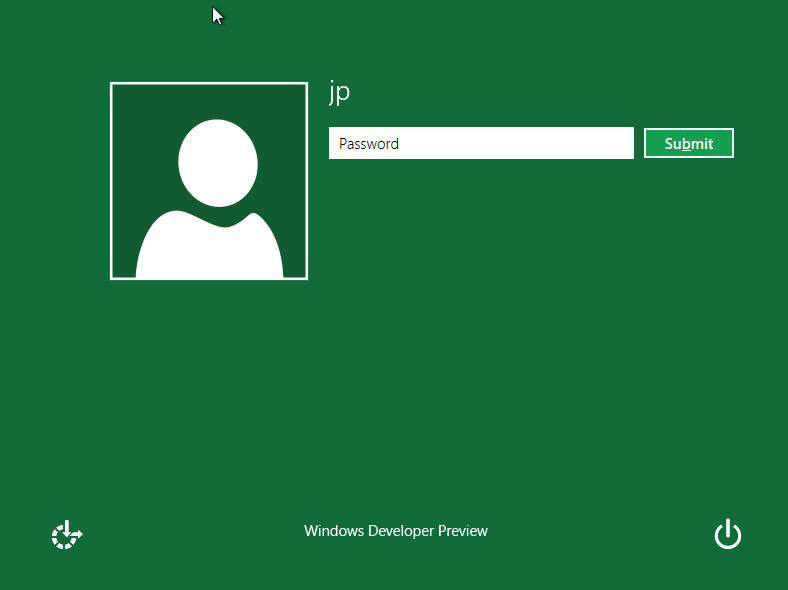
Metro UI Style Login Screen


Windows 8 comes with Internet Explorer 10 (IE10) both in metro and classic UI. Metro IE10 does not allow plugins such as Adobe Flash or Microsoft Silverlight.


Windows now has a new version of multi-tasking. Pressing Windows key suspends the active application. These suspended processes still remain in background and consume RAM, but they don't consume CPU resources. You will be presented with list of all running and suspended applications by opening the regular task manager. You can also choose to suspend those apps which are consuming too much CPU resources. This improves the overall performance speed. The task switching can be done via [Alt] + [Tab] as well as [Windows] + [Tab].


The login or lock screen is also metro-based and shows current date and time and a featuring wide-screen high-resolution image.


Internet Explorer 10 (Classic Windows UI)


Internet Explorer 10 (Metro Style UI)


The only and biggest loss in Windows 8 is Start menu :(. The new Metro UI doesn’t support start menu, instead it launches tile-based metro start screen as described already.


The Windows Explorer in Windows 8 has a brand new ribbon-based UI, with much better functionality. This UI brings back the lost menus in Vista and 7.


(New Explorer with Ribbon-based UI)


The ribbon UI toolbar shows the common options such as extracting ZIP files, properties, open with etc. Some of the common operations can be pinned to Explorer toolbar.


One more plus point with Windows 8, we can virtually mount or burn ISO file without any third-party utility. Just double click on the ISO file we want to mount. It gets automatically mounted as new optical drive. We can also unmount it just by normal eject operation. +1!


The file copy and move interface is also enhanced. All file transfer operations such as copy, move, delete appear in the same window. These operations can be also be paused.


Expanded View of Copy Progress Window


Expanded of copy window shows the graph of changes in file transfer speed versus time.


A new “Automatic” option for aero theme automatically set s the color of window border and title bar based on the current wallpaper.


The new task manager in Windows 8 is very powerful tool. It adds many attributes in addition to CPU and RAM utilization, such as disk and network utilization. It is very detailed.


New Task Manager (Detailed Processes View)


New Task Manager (Performance Statistics)


Windows 8 also offers Control Panel in Metro UI as shown below.


The Windows 8 provides inbuilt Anti-virus technology which includes Smart-Screen filter introduced in IE9. Windows automatically checks the downloaded files using any browser.


One more core improvement in Windows 8, even boot screen has Metro UI! Each boot option is optimized for touch-environment.


Metro UI for Boot Options


There is also serious improvement in boot speed. My PC now starts just in 10 seconds!


Windows 8 comes with in-built feature called as ‘Hyper-V’ for creating and accessing virtual machines. This feature needs to be turned on from ‘Turn Windows Features On or off’ from Control panel. But still this option is not a substitute for VMWare Player.


After all, if you can’t wait for having access to this coolest version of Windows OS, you can download its ISO file (Developer Preview) from this link. You can either mount it virtually or can write it on writable DVD and can proceed towards easy (may be time consuming) installation process.


The minimum hardware requirements for this installation are:


1. 1 GHz or faster 32-bit (x86) or 64-bit (x64) processor


2. 1 GB of RAM (for 32-bit) or 2 GB of RAM (for 64-bit)


3. 20 GB for free hard drive space


4. Screen resolution of 1024 x 768 pixels


Remember, Windows 8 is just the codename for this version OS by Microsoft. The name can be different after its final release. This final release is expected to be in late 2012. This was just a pre-beta version to make developers aware about new development era for Windows Development apart from .NET Framework development. Many much changes are expected in final release. Waiting for your comments!


Regards,


Nitish R. Muley